

In today’s competitive digital world, having a website is not enough. Your website needs to be fast, secure, mobile-friendly, easy to navigate, and accessible to search engines. This is where Technical SEO becomes important. While many businesses focus on keywords, content, and backlinks, technical issues can prevent search engines from properly discovering, crawling, and indexing a website.
Technical SEO is the process of improving the technical foundationWhat Is SEO and How Can It Help Your Business Grow of a website so search engines can access, understand, and index its pages more effectively. It also improves the overall experience for visitors by making websites faster, more secure, and easier to use.
In this technical SEO guide for beginners, we will explain what Technical SEO is, why it matters, its key elements, and a practical technical SEO checklist you can use to improve your website.
What Is Technical SEO?
Technical SEO refers to optimizing the technical aspects of a website that affect its visibility in search engines. Unlike on-page SEO, which focuses mainly on content and keywords, Technical SEO focuses on the structure and performance of the website.
Search engines need to crawl your website, understand its content, and index the pages before they can potentially appear in search results. If technical problems prevent search engine crawlers from accessing important pages, even high-quality content may struggle to perform.
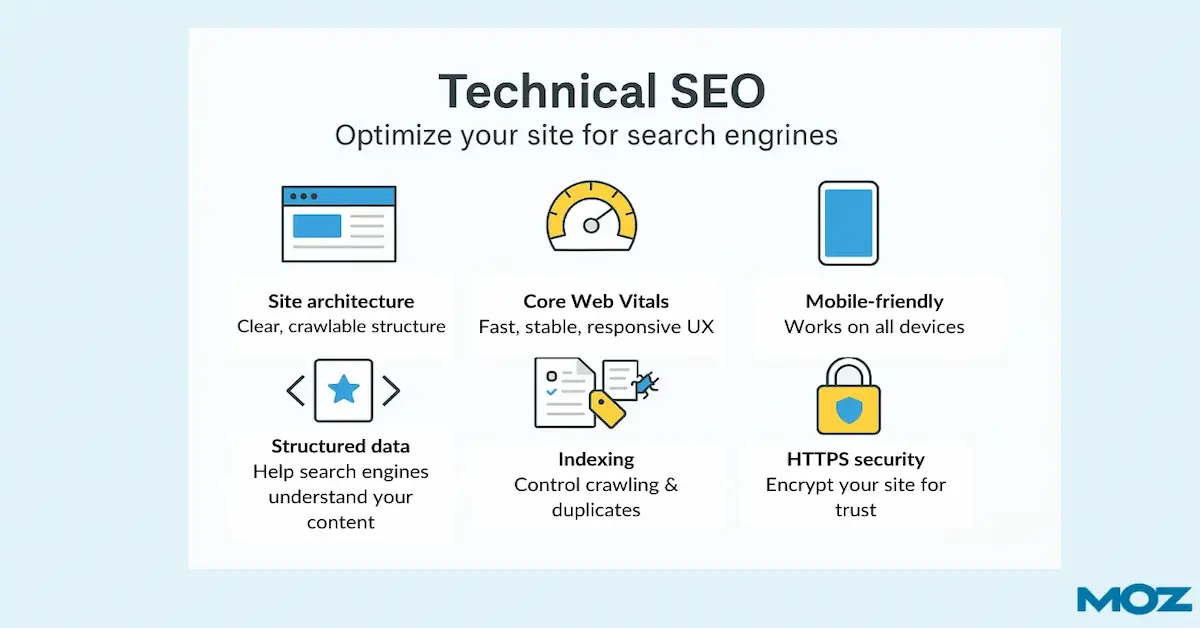
Some important areas of website technical SEO include:
- Website speed and performance
- Mobile-friendliness
- Website security
- Crawlability
- Indexing
- XML sitemaps
- Robots.txt
- URL structure
- Internal linking
- Canonical URLs
- Redirects
- Structured data
- Website architecture
A strong technical foundation helps search engines and users access your website more efficiently.
Why Is Technical SEO Important?
Technical SEO is important because it creates a strong foundation for your entire SEO strategy. You can publish valuable content and target relevant keywords, but technical problems may stop search engines from properly accessing or indexing those pages.
A technically optimized website can provide several benefits:
Better Search Engine Crawling
Search engines use crawlers to discover and understand website pages. A clear website structure, proper internal links, XML sitemap, and correct technical settings can make crawling easier.
Improved Indexing
Crawling and indexing are not the same thing. A search engine may discover a page but still decide not to index it. Proper indexing controls help ensure that important pages are available for search engines to consider.
Faster Website Performance
Website speed is important for both users and search engines. Slow-loading pages can create a poor user experience and may cause visitors to leave before interacting with your website.
Better Mobile Experience
Most users access websites through mobile devices. A website that works well on smartphones and tablets can provide a much better experience than one designed only for desktop users.
Improved Website Security
HTTPS helps protect the connection between users and your website. Website security is particularly important for eCommerce websites, forms, login pages, and websites that process sensitive information.
Important Technical SEO Factors
A successful technical SEO strategy includes several different elements. Let’s look at the most important ones.
1. Improve Website Speed
Website performance should be one of the first things you check during a technical SEO audit.
Large images, unnecessary plugins, excessive scripts, poor hosting, and unoptimized website files can slow down a website.
To improve website speed, you can:
- Compress and optimize images
- Use modern image formats where appropriate
- Reduce unnecessary scripts
- Minimize excessive plugins
- Enable caching
- Improve server performance
- Remove unnecessary website elements
- Optimize CSS and JavaScript
A faster website can provide visitors with a smoother browsing experience.
2. Make Your Website Mobile-Friendly
Mobile optimization is an essential part of modern SEO. Your website should be easy to use on smartphones and tablets.
Check whether:
- Text is readable without zooming
- Buttons are easy to click
- Images fit properly on small screens
- Navigation works correctly
- Forms are easy to complete
- Pages load efficiently on mobile devices
A responsive website automatically adjusts its layout according to the user’s screen size.
3. Check Website Crawlability
Crawlability refers to how easily search engine crawlers can access the pages of your website.
If important pages are accidentally blocked, search engines may have difficulty discovering them.
Common crawlability problems include:
- Incorrect robots.txt rules
- Broken internal links
- Poor website architecture
- Excessive redirects
- Orphan pages
- Server errors
Regular technical SEO audits can help identify and fix these problems.
4. Optimize Your XML Sitemap
An XML sitemap provides search engines with information about important URLs on your website.
Your sitemap should contain the URLs you want search engines to discover and index. It should also be kept updated when important pages are added, removed, or changed.
For WordPress websites, SEO plugins can often help generate and manage XML sitemaps.
After creating your sitemap, you can submit it through Google Search Console to help Google discover your website URLs.
5. Understand Robots.txt
The robots.txt file gives instructions to search engine crawlers about which areas of a website they can or cannot access.
However, robots.txt should be handled carefully. Accidentally blocking important pages or resources can create SEO problems.
Before changing your robots.txt file, make sure you understand which URLs should be crawled and which should not.
6. Create a Clear Website Structure
A well-organized website structure helps both visitors and search engines understand how different pages are connected.
For example, an eCommerce website might have:
Home → Shop → Category → Product
A service website might have:
Home → Services → SEO Services → Contact
Keep important pages easy to reach through your navigation and internal links. A logical structure can also make it easier for search engines to understand the relationship between different sections of your website.
7. Use SEO-Friendly URLs
Your URLs should be simple, descriptive, and easy to understand.
For example:
Good:
example.com/technical-seo-guide/
Less effective:
example.com/page?id=12345
Whenever possible, use relevant words in your URLs and avoid unnecessary characters, long strings, and complicated structures.
8. Fix Broken Links and 404 Errors
Broken links can create a poor user experience and make it harder for visitors and search engines to navigate your website.
A technical SEO audit should identify:
- Broken internal links
- Broken external links
- Missing pages
- 404 errors
- Incorrect redirects
When a page has permanently moved, a suitable 301 redirect can help send users and search engines to the relevant new URL.
9. Use Canonical URLs Correctly
Sometimes the same or very similar content can be accessible through multiple URLs. This can create confusion about which URL should be treated as the preferred version.
Canonical tags can help communicate the preferred URL to search engines.
For example, if similar versions of a product page exist, the canonical URL can help indicate which page should be considered the main version.
Canonicalization should be implemented carefully, especially on large eCommerce websites.
10. Add Structured Data
Structured data helps provide search engines with additional information about the content of a webpage.
Depending on the page, structured data can be used for things such as:
- Products
- Articles
- Organizations
- Local businesses
- Events
- FAQs
- Reviews
When implemented correctly and when eligible, structured data can help search engines better understand page content and may support enhanced search result features.
Technical SEO vs On-Page SEO vs Off-Page SEO
SEO has several important areas, and it is useful to understand their differences.
Technical SEO focuses on the technical foundation of a website, including crawling, indexing, speed, security, and site structure.
On-Page SEO focuses on optimizing elements visible or directly related to webpage content, such as headings, keywords, content, images, titles, and meta descriptions.
Off-Page SEO focuses on activities outside your website, particularly link building, brand mentions, and authority-building activities.
These three areas work together. A strong SEO campaign should not depend on only one of them.
Technical SEO Checklist for Beginners
If you are new to technical SEO, use this simple checklist:
- Check website loading speed
- Test mobile usability
- Make sure HTTPS is active
- Check important pages for indexing
- Create and submit an XML sitemap
- Review the robots.txt file
- Check for broken links
- Fix important 404 errors
- Review redirects
- Improve website architecture
- Optimize internal linking
- Check URL structure
- Review canonical tags
- Add relevant structured data
- Monitor website performance regularly
This technical SEO checklist can help you identify common problems before they negatively affect your website’s search visibility.
Common Technical SEO Mistakes
Businesses often make technical SEO mistakes without realizing it. Some common examples include blocking important pages through robots.txt, leaving broken links unresolved, creating unnecessarily complicated URLs, ignoring mobile optimization, uploading oversized images, and failing to monitor indexing issues.
Another common mistake is treating Technical SEO as a one-time task. Websites continuously change. New pages are published, old pages are removed, plugins are updated, designs change, and technical issues can appear over time.
For this reason, regular website technical SEO audits are important.
How Often Should You Perform a Technical SEO Audit?
There is no single schedule that works for every website. Small websites can perform regular checks every few months, while larger eCommerce websites may need more frequent monitoring.
You should also consider an audit after major website changes such as:
- Website redesign
- Domain migration
- Hosting migration
- Major URL changes
- Website platform migration
- Large-scale content updates
- eCommerce category or product restructuring
Regular monitoring helps businesses identify technical issues before they become bigger SEO problems.
Conclusions
Technical SEO is the foundation that supports your overall search engine optimization strategy. It helps search engines crawl, understand, and index your website while also improving the experience for your visitors.
From website speed and mobile optimization to XML sitemaps, crawlability, redirects, structured data, and internal linking, every technical element contributes to a healthier website.
If your website has great content but is not getting the visibility you expect, technical problems could be part of the reason. A detailed technical SEO audit can help identify these issues and provide a clear roadmap for improvement.
At Work N Solution, we understand that effective SEO requires more than simply adding keywords to webpages. Our SEO and digital marketing solutions focus on building a strong online presence, improving website performance, and helping businesses reach their target audience.
Whether you are launching a new website or improving an existing one, investing in Technical SEO can give your website a stronger foundation for long-term organic growth.