


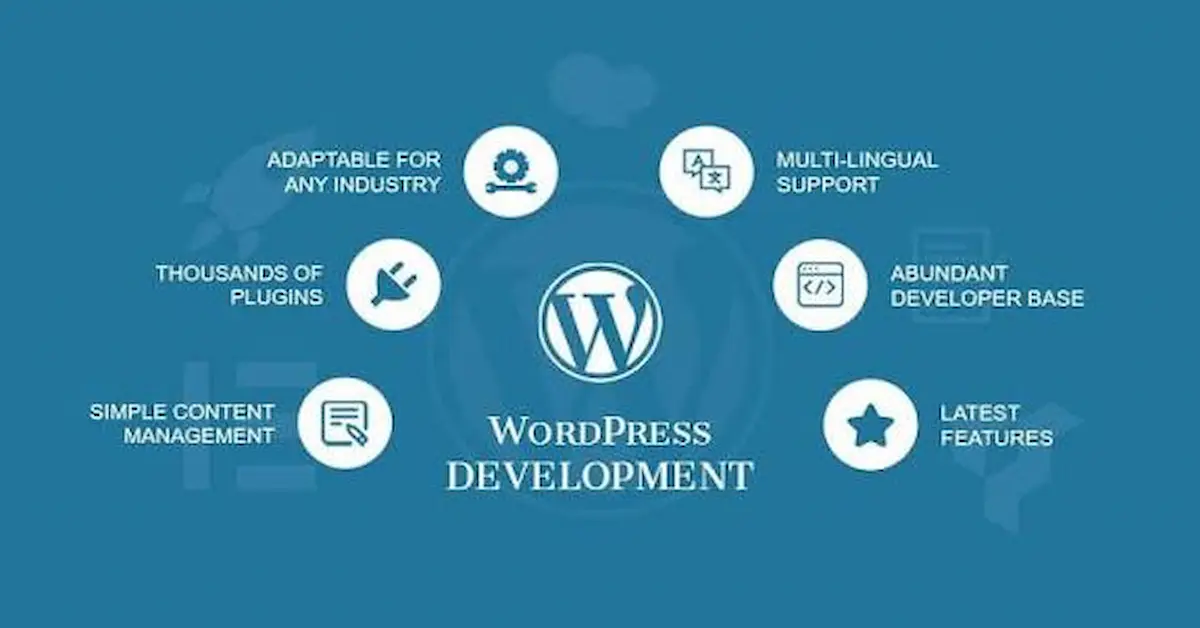
A professional website is one of the most important assets for a modern business. Whether you run a small local business, an eCommerce store, a personal brand, or a growing company, having a strong online presence can help you reach more customers and build credibility. WordPress website development is one of the most popular ways to create a professional, flexible, and scalable website.
WordPress provides tools for creating websites without requiring advanced coding knowledge, while developers can also use its themes, plugins, APIs, and development tools to build highly customized websites. Official WordPress documentation provides beginner resources covering planning, installation, themes, plugins, publishing, and site management.
In this complete beginner’s guide, you will learn what WordPress website development is, how it works, its benefits, and the important steps involved in creating a WordPress website.
What Is WordPress Website Development?
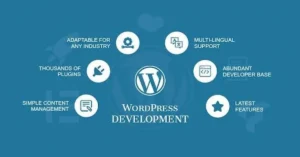
WordPress website development refers to the process of creating, designing, customizing, and maintaining websites using WordPress. It can involve everything from setting up WordPress and selecting a theme to creating custom layouts, adding functionality, optimizing performance, and maintaining website security.
WordPress can be used for many different types of websites, including:
- Business websites
- Blogs and news websites
- Portfolio websites
- eCommerce stores
- Service-based business websites
- Educational websites
- Membership websites
- Personal websites
- Landing pages
For beginners, WordPress offers a relatively straightforward way to manage website content. For professional developers, it provides a flexible platform that can be extended through themes, plugins, custom code, and other development tools.
Why Is WordPress So Popular?
One of the biggest reasons businesses choose WordPress is its flexibility. A website can start with a simple structure and later be expanded as the business grows.
WordPress also provides a large ecosystem of themes and plugins. Themes influence the visual appearance and layout of a website, while plugins can add additional functionality. WordPress documentation describes plugins as add-ons that extend the capabilities of a WordPress website.
Some common benefits include:
1. Easy Content Management
Business owners can update pages, publish blog posts, add images, and manage website content through the WordPress dashboard.
2. Flexible Design
WordPress websites can be customized to match a company’s branding, colors, typography, and business requirements.
3. Plugin Functionality
Plugins can add features such as contact forms, SEO tools, security features, analytics integration, caching, backups, and eCommerce functionality.
4. SEO-Friendly Structure
WordPress provides a strong foundation for creating search-engine-friendly websites. However, achieving good rankings still requires proper keyword research, content, technical SEO, website performance, and ongoing optimization.
5. Scalability
A WordPress website can begin as a simple company website and later expand with additional pages, services, blog content, or eCommerce functionality.
WordPress Website Development vs. Website Design
These two terms are related but not exactly the same.
WordPress website design mainly focuses on how a website looks and feels. It includes layout, colors, typography, images, navigation, spacing, and overall user experience.
WordPress website development is broader. It includes the technical setup and functionality required to make the website work properly.
For example, designing a contact page is part of website design, while configuring the contact form, validation, email delivery, integrations, and functionality can fall under development.
A professional project usually combines both WordPress web design and development to create a website that looks professional and performs effectively.
How to Build a WordPress Website Step by Step
Creating a successful WordPress website involves several important stages.
Step 1: Define Your Website Goals
Before starting development, determine what the website needs to accomplish.
Ask questions such as:
- What is the purpose of the website?
- Who is the target audience?
- What products or services will be offered?
- Do you need online payments?
- Do you need lead-generation forms?
- Will the website include a blog?
- What actions should visitors take?
Creating a clear plan before installation can help prevent unnecessary changes later. WordPress also recommends planning your site’s structure, pages, categories, content strategy, and other requirements before building the site.
Step 2: Choose a Domain Name and Hosting
A domain name is your website’s address, such as yourbusiness.com.
Web hosting is where your website’s files and database are stored so visitors can access the site online.
When choosing hosting, consider:
- Website speed
- Server reliability
- Security
- Backup options
- Customer support
- Scalability
- WordPress compatibility
WordPress’s official beginner resources identify choosing hosting and registering a domain as important initial steps when setting up a website.
Step 3: Install WordPress
After purchasing hosting and a domain, WordPress needs to be installed.
Many hosting providers offer simplified WordPress installation, while developers can also install WordPress manually or create development environments for testing.
For professional development, a separate development or staging environment can be useful because changes can be tested before they are pushed to the live website. WordPress’s developer documentation specifically recommends development environments for testing before making changes to a production site.
Step 4: Select a Theme
A WordPress theme controls many aspects of a website’s design and layout.
When selecting a theme, consider:
- Mobile responsiveness
- Page speed
- Customization options
- Accessibility
- Compatibility
- Regular updates
- Clean design
Modern WordPress development also includes block themes and the Site Editor, which allow users to customize various parts of a website visually.
For businesses, the theme should not simply look attractive. It should also support usability, conversions, performance, and the company’s overall branding.
Step 5: Create Essential Website Pages
Most business websites require several important pages.
These may include:
- Home
- About Us
- Services
- Portfolio
- Blog
- Contact Us
- Privacy Policy
- Terms and Conditions
The exact structure depends on the business. For example, an eCommerce website may also need product categories, product pages, cart, checkout, and customer account pages.
Step 6: Customize the Website
Once the basic structure is ready, the website can be customized according to the brand.
This may include:
- Logo placement
- Brand colors
- Typography
- Navigation menus
- Buttons
- Images
- Service sections
- Testimonials
- Contact forms
- Calls to action
The objective should be to create a website that is visually professional while making it easy for visitors to find information and take action.
WordPress Plugins and Their Importance
Plugins are one of the major reasons WordPress is so flexible. They allow developers and website owners to add functionality without building every feature from scratch.
Depending on the website, plugins may be used for:
- SEO
- Security
- Backups
- Contact forms
- Caching
- Analytics
- Image optimization
- eCommerce
- Spam protection
- Social media integration
However, installing too many unnecessary plugins can create maintenance and performance problems. A better approach is to use reliable plugins that provide a genuine business or technical benefit.
WordPress Website SEO
Building a website is only the first step. People also need to be able to find it through search engines.
WordPress SEO involves optimizing different parts of a website to improve its visibility in search results.
Important areas include:
- Keyword research
- SEO-friendly URLs
- Page titles
- Meta descriptions
- Heading structure
- Internal linking
- Image optimization
- Helpful content
- Mobile usability
- Website speed
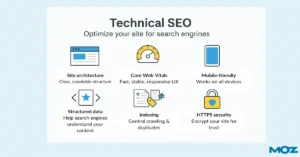
- Technical SEO
For example, if a company provides web development services, it could create optimized pages around relevant searches such as WordPress website development, WordPress development services, and WordPress website design.
SEO should be considered during development rather than added as an afterthought.
Mobile-Friendly WordPress Development
A large number of website visitors use smartphones and tablets. Therefore, a professional website should work properly across different screen sizes.
Responsive WordPress development ensures that:
- Text remains readable
- Buttons are easy to tap
- Images fit the screen
- Navigation works properly
- Sections do not overflow
- Forms remain usable
A website that looks good only on a desktop computer can create a poor user experience for mobile visitors.
Website Speed and Performance
Website performance is another important part of professional WordPress website development.
Slow websites can frustrate visitors and may negatively affect the overall user experience.
Developers can improve performance by:
- Compressing images
- Using optimized themes
- Reducing unnecessary plugins
- Implementing caching
- Optimizing website code
- Using suitable hosting
- Reducing unnecessary scripts
Performance optimization should be considered throughout development instead of waiting until the website is complete.
WordPress Website Security
Security should also be part of every WordPress development project.
Basic security practices include:
- Using strong passwords
- Keeping WordPress updated
- Updating themes and plugins
- Using trusted plugins
- Creating regular backups
- Limiting unnecessary user permissions
- Using SSL/HTTPS
- Monitoring suspicious activity
Regular maintenance is important because a website is not a one-time project. WordPress documentation includes dedicated resources for maintenance, updates, and security.
Why Choose Professional WordPress Website Development?
While beginners can create simple websites themselves, professional development can be valuable when a business requires a customized, secure, fast, and conversion-focused website.
A professional WordPress developer can help with:
- Custom website design
- Responsive development
- Theme customization
- Plugin configuration
- Custom functionality
- Website migration
- Speed optimization
- SEO-friendly structure
- Security
- Website maintenance
Professional development can also save time and reduce technical problems that may occur when a website is built without proper planning.
Final Thoughts
WordPress website development provides businesses with a flexible way to establish and grow their online presence. From a simple business website to a complete eCommerce platform, WordPress can support many different types of online projects.
The key to a successful website is not simply installing WordPress or choosing an attractive theme. A professional website requires proper planning, responsive design, useful content, SEO optimization, performance, security, and ongoing maintenance.
If you are planning to create a new website or improve an existing one, professional WordPress website development services can help turn your ideas into a functional and user-friendly online presence.